Email Us
 Freight Forwarding Software
 Warehouse Management System
 Transport Management System
 Moving/Removal Software
 Customer Service Portal
 Move Survey Quote Pro
 Digital Logistics Inventory App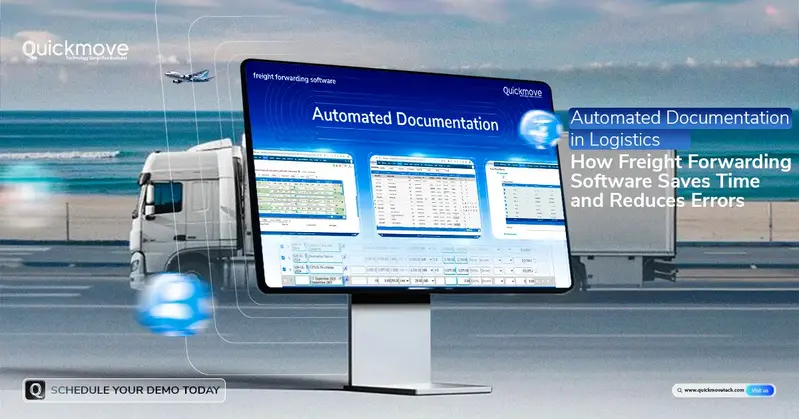
Documentation is one of the most important parts of freight forwarding and logistics operations. From Bills of Lading and commercial invoices to shipping instructions and delivery documents, every shipment requires accurate and timely paperwork.
As shipment volumes grow, managing these documents manually can become a major challenge. Logistics teams may spend hours entering the same information into different documents, checking details, correcting errors, and sending paperwork to customers, carriers, and other stakeholders.
This is where automated documentation can transform logistics operations.
Modern freight forwarding software enables logistics companies to generate important shipping documents quickly, using information already stored within the system. Instead of creating every document manually, teams can generate Bills of Lading, invoices, shipping instructions, and other documents in just a few clicks.
For growing freight forwarders, this can mean less administrative work, fewer errors, faster processing, and better operational efficiency.
What Is Automated Documentation in Logistics?
Automated documentation is the use of logistics technology to create, manage, and process shipment-related documents with minimal manual data entry.
Traditional documentation often requires employees to:
- Collect shipment information.
- Enter the information into spreadsheets or templates.
- Create individual documents.
- Check the information for errors.
- Make corrections.
- Send documents to customers or partners.
- Store copies for future reference.
With logistics software, much of this process can be streamlined.
Once shipment information is entered into the system, the relevant data can be used to generate multiple documents without repeatedly entering the same information.
This creates a more connected documentation workflow.
Why Manual Documentation Is a Problem for Freight Forwarders
Manual documentation may work when shipment volumes are low.
However, as a freight forwarding business grows, paperwork can quickly become a bottleneck.
Common challenges include:
- Repeated data entry
- Incorrect shipment information
- Missing documents
- Duplicate records
- Delayed documentation
- Inconsistent document formats
- Difficulty locating old documents
- Time-consuming corrections
- Communication delays
- Increased administrative workload
Even a small documentation error can cause unnecessary delays or additional costs.
For example, an incorrect consignee name, shipment reference, cargo detail, or billing amount may require a document to be recreated and redistributed.
Freight management software helps reduce these problems by connecting documentation with the underlying shipment data.
1. Generate Bills of Lading Faster
The Bill of Lading is a critical document in freight transportation.
Creating Bills of Lading manually can require employees to enter information such as:
- Shipper details
- Consignee information
- Carrier details
- Cargo description
- Package information
- Weight and volume
- Port information
- Shipment references
With automated documentation, relevant shipment information can be pulled from the system and used to generate the document.
This can significantly reduce repetitive data entry and help teams process documentation faster.
2. Automate Invoice Generation
Billing is another area where manual documentation can consume valuable time.
Employees may need to collect shipment charges, customer information, taxes, service fees, and other billing details before creating an invoice.
An automated logistics software platform can connect shipment and financial information, helping teams generate invoices more efficiently.
This can help businesses:
- Reduce billing delays
- Minimize manual calculations
- Improve invoice accuracy
- Process more shipments
- Maintain better financial records
Faster invoicing can also support healthier cash flow for growing logistics businesses.
3. Simplify Shipping Instructions
Shipping instructions contain important information required to coordinate shipments.
Manually preparing shipping instructions for every shipment can create unnecessary administrative work.
With a freight forwarding management system, teams can maintain shipment information in one centralized location and use that data to prepare shipping instructions more efficiently.
This helps reduce repeated data entry and gives employees more time to focus on shipment coordination and customer service.
4. Reduce Repetitive Data Entry
One of the biggest advantages of automated documentation is reducing repetitive data entry.
Consider a shipment containing customer, cargo, routing, carrier, and billing information.
Without an integrated system, an employee may enter the same information into:
- A quotation
- Booking record
- Bill of Lading
- Shipping instructions
- Commercial invoice
- Customer communication
- Internal reports
Entering the same information repeatedly increases the possibility of errors.
With digital freight software, information can be maintained centrally and reused across different workflows.
This allows employees to spend less time typing and more time managing operations.
5. Reduce Documentation Errors
Accuracy is critical in freight forwarding.
A single incorrect field can create problems throughout the shipment process.
Automated documentation can help improve accuracy by using existing shipment information rather than requiring employees to manually re-enter the same details multiple times.
This reduces the possibility of:
- Incorrect customer information
- Incorrect cargo details
- Wrong shipment references
- Billing discrepancies
- Missing information
- Inconsistent records
Although automation does not eliminate the need for human review, it can significantly reduce avoidable manual errors.
6. Keep Documents Consistent
Professional documentation creates a more organized logistics operation.
When different employees create documents manually, formatting and information may vary from one document to another.
A centralized logistics management system can help standardize document generation.
Businesses can establish consistent templates and workflows for important documents, helping maintain a professional and organized documentation process.
7. Access Documents From One Centralized Platform
Finding old shipment documents can be difficult when information is spread across email inboxes, spreadsheets, local folders, and different systems.
A centralized freight management platform can make document management easier by keeping shipment-related information connected within one system.
Teams can spend less time searching for documents and more time managing their customers and shipments.
This is particularly useful for growing freight forwarders that handle a large number of shipments every month.
8. Improve Customer Service
Customers expect logistics companies to provide information quickly.
When customers request a Bill of Lading, invoice, shipping instruction, or other shipment document, employees should not have to spend excessive time searching through different systems.
Automated documentation allows teams to access and generate relevant documents more efficiently.
This can lead to:
- Faster responses
- Better communication
- Improved transparency
- Greater customer satisfaction
For freight forwarding businesses competing in a highly competitive market, faster service can become an important advantage.
9. Support High Shipment Volumes
As a freight forwarding business grows, documentation requirements grow with it.
A company handling dozens of shipments may manage its paperwork manually. But when shipment volumes reach hundreds or thousands, the same approach becomes difficult to maintain.
This is where scalable freight forwarding software becomes valuable.
Automated documentation enables businesses to process more shipments without requiring employees to manually recreate every document from scratch.
The result is a more scalable documentation process.
10. Connect Documentation With the Entire Logistics Workflow
Documentation should not exist separately from freight operations.
Ideally, documentation should be connected with other processes such as:
Quotation → Booking → Shipment → Documentation → Tracking → Billing → Delivery
When these processes operate within a connected platform, information can move more efficiently between different stages of the shipment lifecycle.
An end-to-end logistics software solution can help create this connected workflow.
How QuickMove Helps Automate Logistics Documentation
QuickMove is designed to help freight and logistics businesses streamline their operations through a centralized digital platform.
With QuickMove, businesses can simplify documentation workflows and reduce the amount of manual work involved in preparing shipment-related documents.
The platform can support important logistics activities such as:
- Freight quotations
- Shipment management
- Booking management
- Bills of Lading
- Invoicing
- Shipping instructions
- Shipment tracking
- Transportation management
- Warehouse operations
- Customer management
Instead of managing documents and shipment information across multiple disconnected tools, businesses can bring important processes together within one platform.
Automated Documentation vs. Manual Documentation
| Manual Documentation | Automated Documentation |
| Repeated data entry | Centralized shipment data |
| Time-consuming document creation | Faster document generation |
| Higher risk of typing errors | Reduced manual errors |
| Documents stored across multiple locations | Centralized document management |
| Difficult to scale | Designed to support growing shipment volumes |
| More administrative work | Reduced repetitive workload |
| Slower customer responses | Faster document access |
The goal is not simply to replace paperwork with software. The goal is to create a faster, more accurate, and scalable documentation process.
Who Can Benefit From Automated Documentation?
Automated documentation can benefit a wide range of logistics businesses, including:
Freight Forwarders
Freight forwarders managing high shipment volumes can automate repetitive documentation processes and improve operational efficiency.
Logistics Service Providers
Companies managing multiple logistics services can centralize shipment and documentation workflows.
Transport Companies
Transportation businesses can improve the creation and management of shipment-related documents.
Import and Export Businesses
Businesses involved in international trade can benefit from more organized documentation workflows.
Growing Logistics Companies
Companies experiencing increasing shipment volumes can use automation to scale operations without continuously increasing administrative workload.
Why Automated Documentation Matters for Growing Businesses
Business growth should not create more paperwork.
As shipment volumes increase, logistics companies need technology that can handle higher operational demands while maintaining accuracy and visibility.
Automated documentation helps businesses move away from repetitive administrative processes and toward more efficient digital workflows.
Instead of asking employees to spend hours creating documents manually, companies can allow technology to handle repetitive processes while employees focus on higher-value activities.
The Future of Freight Documentation Is Digital
The logistics industry is moving toward increasingly connected and automated operations.
Digital freight platforms are helping companies manage shipments, documentation, billing, tracking, and customer communication from centralized systems.
For modern freight forwarders, automation is becoming an important part of building a scalable operation.
Businesses that invest in digital freight software can create more efficient workflows, improve data accuracy, and prepare their operations for future growth.
Final Thoughts
Documentation is essential to freight forwarding, but manually creating and managing documents can consume significant time and resources.
Automated documentation provides a smarter approach. By using freight forwarding software, businesses can generate Bills of Lading, invoices, shipping instructions, and other important documents more efficiently. Automation can reduce repetitive data entry, minimize errors, improve document consistency, and help logistics companies process growing shipment volumes.
QuickMove brings these capabilities together within an integrated logistics platform, helping businesses simplify their freight operations and improve efficiency.