Email Us
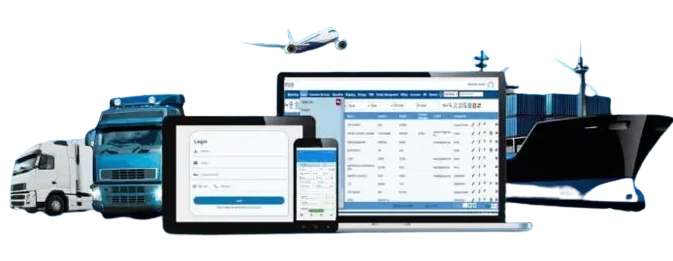
 Freight Forwarding Software
 Warehouse Management System
 Transport Management System
 Moving/Removal Software
 Customer Service Portal
 Move Survey Quote Pro
 Digital Logistics Inventory App
The freight forwarding industry has become more complex than ever before. With increasing shipment volumes, rising customer expectations, evolving customs regulations, and tighter delivery schedules, logistics companies are under constant pressure to operate faster and more efficiently.
Despite these growing demands, many freight forwarders still rely on manual processes such as spreadsheets, shared inboxes, phone calls, and disconnected software systems to manage daily operations. While these methods may have worked in the past, they often lead to delays, communication gaps, data entry errors, and higher operational costs.
Every shipment involves multiple stakeholders including shippers, consignees, carriers, customs brokers, warehouse teams, and finance departments.
Coordinating communication among all these parties manually can become overwhelming, especially as shipment volumes increase.
This is where freight forwarding software has become an essential solution for logistics businesses.
Modern freight forwarding software centralizes every aspect of logistics operations into a single platform. It enables companies to manage shipments, automate repetitive tasks, monitor documentation, track cargo in real time, generate freight quotations, and improve customer communication through freight automation and email automation.
Instead of spending valuable time on administrative work, logistics teams can focus on delivering exceptional customer service, expanding their business, and improving operational efficiency.
In this comprehensive guide, you’ll learn:
- What freight forwarding software is
- Why freight automation is becoming essential
- How email automation simplifies logistics communication
- The key features every freight forwarding company should look for
- The business benefits of automation
- How QuickMove Freight Forwarding Software helps modern logistics companies stay competitive
Why the Freight Forwarding Industry Needs Digital Transformation
The logistics industry has experienced rapid digital transformation over the last decade. Customers no longer expect basic shipment tracking they demand instant quotations, proactive updates, accurate documentation, and real-time visibility throughout the shipping process.
At the same time, freight forwarders must coordinate with multiple carriers, manage customs documentation, monitor delivery milestones, and respond quickly to customer inquiries. Handling these tasks manually increases the risk of delays, missed communications, and operational inefficiencies.
As global supply chains continue to evolve, digital solutions are becoming a necessity rather than a luxury. Freight forwarding software empowers logistics companies to replace fragmented processes with an integrated platform that streamlines operations from the first customer inquiry to final delivery.
By automating repetitive tasks, businesses can reduce administrative burdens, improve accuracy, and provide a better customer experience.
What Is Freight Forwarding Software?
Freight forwarding software is a comprehensive digital solution that enables logistics companies to manage and automate the entire freight forwarding process.
Instead of using separate tools for customer communication, shipment tracking, documentation, quotations, and invoicing, freight forwarding software combines these functions into a centralized system.
The software supports every stage of the freight lifecycle, including:
- Customer inquiry management
- Freight quotations
- Booking management
- Shipment planning
- Air, ocean, and road freight operations
- Documentation management
- Customs coordination
- Cargo tracking
- Invoice generation
- Customer communication
- Reporting and analytics
The goal is to simplify complex logistics operations while improving efficiency, visibility, and collaboration.
Common Challenges Faced by Freight Forwarders
Even experienced freight forwarding companies face operational challenges when relying on manual processes.
1. High Volume of Emails
A freight forwarding office may receive hundreds of emails each day. These messages can include:
- Rate requests
- Booking confirmations
- Shipment updates
- Customs documentation
- Commercial invoices
- Packing lists
- Payment queries
- Delivery instructions
- Customer follow-ups
Sorting, forwarding, and responding to these emails manually consumes significant time and increases the chance of delays or missed communications.
2. Manual Data Entry
Employees often copy shipment information from emails into spreadsheets or multiple systems. Re-entering the same data repeatedly is not only time-consuming but also increases the risk of errors.
Incorrect shipment details can result in delayed bookings, documentation mistakes, and dissatisfied customers.
3. Disconnected Communication
When communication is spread across individual inboxes, phone calls, and messaging platforms, it becomes difficult for teams to access complete shipment histories.
This lack of visibility can lead to duplicate work, inconsistent customer responses, and slower decision-making.
4. Document Management Issues
Every shipment generates multiple documents, such as:
- Bill of Lading (B/L)
- Air Waybill (AWB)
- Commercial Invoice
- Packing List
- Certificate of Origin
- Delivery Order
- Customs Declaration
- Freight Invoice
Without a centralized system, locating the correct document during audits or customer requests can be challenging.
5. Slow Quotation Process
Customers expect fast responses when requesting freight quotations.
If pricing teams manually gather carrier rates, calculate costs, and prepare quotations, response times may take several hours or even days resulting in lost business opportunities.
Understanding Freight Automation
Freight automation refers to the use of technology to automate repetitive logistics tasks that traditionally required manual effort.
Instead of employees performing the same administrative activities every day, freight forwarding software automatically executes these tasks based on predefined workflows.
Examples of freight automation include:
- Automatic shipment creation
- Email notifications
- Quote generation
- Carrier rate management
- Task assignment
- Document generation
- Workflow approvals
- Invoice creation
- Shipment tracking updates
- Customer alerts
By automating routine operations, freight forwarders can improve productivity while minimizing human error.
What Is Email Automation in Freight Forwarding?
Email remains one of the most important communication channels in the logistics industry. Every shipment generates numerous email exchanges between customers, carriers, customs brokers, warehouse teams, and internal staff.
Managing these communications manually can become overwhelming as shipment volumes increase.
Email automation allows freight forwarding software to automatically send, organize, and track emails based on shipment events and predefined workflows.
For example, the software can automatically:
- Send booking confirmations
- Notify customers when cargo is dispatched
- Share shipment milestones
- Deliver invoices
- Send payment reminders
- Request missing documets
- Notify internal teams about pending approvals
- Send delivery confirmations
By reducing manual communication, email automation helps logistics teams respond faster while maintaining consistency and professionalism.
Why Email Automation Is a Game-Changer for Freight Forwarders
Email automation is more than just a convenience—it is a strategic advantage.
When integrated into freight forwarding software, it helps companies:
- Respond to customers faster
- Reduce manual administrative work
- Eliminate repetitive communication tasks
- Improve collaboration across departments
- Reduce missed emails and follow-ups
- Ensure timely shipment updates
- Maintain complete communication records
- Enhance customer satisfaction
For growing logistics businesses, these benefits translate into improved efficiency, stronger customer relationships, and increased competitiveness.
How Freight Forwarding Software Automates the Entire Logistics Workflow
Modern freight forwarding is no longer just about transporting goods from one location to another. Every shipment involves numerous operational activities, including receiving customer inquiries, preparing quotations, booking carriers, generating documentation, coordinating with customs brokers, tracking cargo, invoicing customers, and maintaining constant communication.
Managing all these activities manually can slow operations, increase costs, and create unnecessary errors.
This is where freight forwarding software delivers exceptional value. Instead of relying on disconnected spreadsheets, email inboxes, and paper documents, the software automates every stage of the freight forwarding process through intelligent freight automation and email automation.
Let’s explore how a modern freight forwarding solution transforms daily logistics operations.
Step 1: Customer Inquiry Management
Every shipment begins with a customer inquiry.
Typically, customers contact freight forwarders via:
- Phone
- Website inquiry forms
- Sales representatives
- Existing customer portals
Without a centralized system, these inquiries often remain scattered across multiple communication channels.
Freight forwarding software captures customer inquiries in one place, ensuring that no opportunity is missed. Sales teams can instantly access customer history, previous shipments, pricing records, and communication logs before responding.
This improves response times while creating a more personalized customer experience.
Step 2: Faster Freight Quotations
Preparing freight quotations manually is often one of the most time-consuming tasks in logistics.
Pricing teams need to gather information such as:
- Origin
- Destination
- Cargo dimensions
- Weight
- Shipping mode
- Carrier rates
- Fuel surcharges
- Additional service charges
Modern freight forwarding software simplifies this process by maintaining centralized carrier tariffs and pricing rules.
Instead of manually calculating every quotation, logistics teams can generate professional quotes within minutes.
Benefits of Automated Freight Quotations
- Faster customer response
- Improved pricing accuracy
- Standardized quotation formats
- Reduced manual calculations
- Better quotation tracking
- Increased conversion rates
Customers appreciate faster turnaround times, while freight companies improve their chances of winning new business.
Step 3: Booking Management
Once a customer approves the quotation, the booking process begins.
Instead of manually entering shipment details into multiple systems, freight forwarding software automatically creates shipment records using the approved quotation.
The software stores information such as:
- Customer details
- Pickup location
- Delivery location
- Cargo information
- Container type
- Shipping schedule
- Carrier information
- Internal task assignments
Automation reduces repetitive data entry and ensures consistency throughout the shipment lifecycle.
Step 4: Email Automation Throughout the Shipment
Communication is one of the most critical aspects of freight forwarding.
Every shipment requires multiple emails between customers, shipping lines, airlines, transport providers, customs brokers, warehouse operators, and internal departments.
Manually managing these communications consumes valuable time.
This is where freight automation for email becomes a game-changer.
Using predefined workflows, the software automatically sends emails whenever shipment milestones occur.
Examples include:
- Booking confirmation
- Pickup confirmation
- Cargo received notification
- Customs clearance updates
- Shipment departure alerts
- Arrival notifications
- Delivery confirmation
- Invoice reminders
- Payment confirmations
Instead of writing repetitive emails, employees can focus on solving customer problems and managing exceptions.
Step 5: Automated Document Management
Documentation is one of the most important responsibilities of every freight forwarding company.
Each shipment may require several documents, including:
- Bill of Lading (B/L)
- Air Waybill (AWB)
- Commercial Invoice
- Packing List
- Certificate of Origin
- Customs Declaration
- Delivery Order
- Freight Invoice
- Proof of Delivery
Freight forwarding software stores these documents digitally and links them directly to each shipment.
Employees can retrieve documents instantly without searching through email attachments or physical folders.
Benefits include:
- Faster document retrieval
- Better compliance
- Reduced paperwork
- Improved collaboration
- Enhanced document security
Step 6: Shipment Tracking and Customer Visibility
Customers increasingly expect real-time visibility into their shipments.
Freight forwarding software enables logistics companies to monitor shipment milestones from pickup to final delivery.
Important shipment events may include:
- Cargo picked up
- Cargo received at warehouse
- Customs cleared
- Vessel departed
- Flight departed
- Shipment arrived
- Out for delivery
- Delivered successfully
These updates can also trigger automated customer notifications through email or SMS, keeping customers informed without manual follow-ups.
Step 7: Automated Workflow Management
Every freight forwarding company follows a series of operational workflows.
Instead of assigning tasks manually, modern logistics software automates these processes based on predefined business rules.
For example:
These automated workflows ensure that every department knows what needs to be done without relying on manual reminders.
Manual Process vs Freight Automation
Key Features Every Freight Forwarding Software Should Include
Choosing the right software is an important business decision. The best platforms combine operational efficiency, automation, and customer service in one integrated system.
Essential features include:
Shipment Management :- Manage air, ocean, road, and multimodal shipments from a centralized dashboard.
Freight Quotation Management :- Generate accurate quotations quickly using stored carrier tariffs and pricing rules.
Email Automation :- Automatically send shipment updates, booking confirmations, invoices, reminders, and customer notifications.
CRM Integration :- Maintain complete customer profiles, communication history, and shipment records in one place.
Document Management :- Store and organize all shipment documents securely for quick access and improved compliance.
Workflow Automation :- Automate repetitive logistics tasks, approvals, notifications, and internal assignments.
Reporting and Analytics :- Track operational performance, shipment volumes, revenue, customer activity, and team productivity through customizable dashboards.
Multi-User Collaboration :- Enable sales, operations, documentation, finance, and customer support teams to collaborate efficiently on a single platform.
Business Benefits of Freight Automation
Implementing freight forwarding software delivers measurable improvements across the organization.
Increased Productivity :- Automation eliminates repetitive administrative work, allowing employees to focus on strategic activities such as customer service and business development.
Faster Response Times :- Customers receive quotations, shipment updates, and documentation much faster, improving satisfaction and trust.
Reduced Human Errors :- By automating data entry and workflows, companies minimize costly mistakes in pricing, documentation, and shipment processing.
Improved Customer Experience :- Real-time communication and consistent updates help build stronger customer relationships and improve retention.
Better Collaboration :- All departments work from a shared system, reducing duplicate work and improving communication.
Operational Cost Savings :- Less manual effort means lower administrative costs and the ability to manage higher shipment volumes without proportionally increasing staff.
Greater Scalability :- As your business grows, freight forwarding software helps you handle more customers and shipments efficiently without compromising service quality.
Why Email Automation Is More Than Just Sending Emails
Many businesses assume email automation simply means scheduling messages. In reality, it’s about integrating communication into your logistics workflow.
With a solution like QuickMove, email automation can support every stage of the shipment lifecycle by ensuring the right information reaches the right people at the right time.
Instead of employees manually tracking every shipment and drafting repetitive emails, the software automatically keeps customers, carriers, and internal teams informed. This reduces communication delays, improves transparency, and creates a more professional customer experience.
When combined with freight workflow automation, email automation becomes a powerful productivity tool that helps logistics companies operate faster, reduce errors, and deliver better service.
Why Choose QuickMove Freight Forwarding Software?
Choosing the right freight forwarding software is not just about replacing spreadsheets or reducing paperwork—it’s about building a more efficient, scalable, and customer-focused logistics business.
As freight operations become increasingly complex, businesses need a solution that centralizes processes, improves collaboration, and automates repetitive tasks. QuickMove Freight Forwarding Software is designed to meet these needs by providing an all-in-one platform for freight forwarders, NVOCCs, customs brokers, and logistics service providers.
With QuickMove, logistics companies can manage their entire freight lifecycle from a single dashboard, reducing operational complexity while improving visibility and productivity.
How QuickMove Supports Your Freight Operations
QuickMove Freight Forwarding Software is designed to simplify every stage of the logistics process, from the initial customer inquiry to final delivery
Some of its key capabilities include:
Freight Quotation Management :- Create accurate freight quotations quickly using stored carrier tariffs and pricing rules. Faster quotations enable logistics companies to respond to customer inquiries promptly and improve their chances of winning new business.
Shipment Management :- Manage import and export shipments for air freight, sea freight, and road transportation through one centralized platform.
Users can monitor shipment progress, assign operational tasks, and track milestones without switching between multiple systems.
Email & SMS Automation :- Communication plays a critical role in freight forwarding. QuickMove helps businesses automate routine communications, including:
- Booking confirmations
- Shipment status updates
- Delivery notifications
- Invoice reminders
- Customer acknowledgements
- Internal operational alerts
Automating these communications ensures that customers receive timely updates while reducing the administrative burden on employees.
Document Management :- Every shipment generates multiple documents that must be organized and easily accessible.
QuickMove allows logistics teams to securely manage:
- Bills of Lading
- Air Waybills
- Commercial Invoices
- Packing Lists
- Delivery Orders
- Customs Documents
- Proof of Delivery
Centralized document management minimizes paperwork, reduces the risk of lost files, and improves operational efficiency.
Customer Relationship Management (CRM) :-
Building strong customer relationships is essential for long-term success.
QuickMove enables businesses to maintain complete customer records, including:
- Contact details
- Shipment history
- Communication records
- Quotations
- Invoices
- Customer preferences
Having this information readily available allows teams to provide faster and more personalized customer service.
Reporting & Business Analytics :-
Operational data is valuable only when it can be analyzed effectively.
QuickMove provides reporting dashboards that help businesses monitor:
- Shipment performance
- Revenue trends
- Customer activity
- Operational efficiency
- Team productivity
These insights enable management teams to make informed business decisions based on real-time data.
Best Practices for Implementing Freight Forwarding Software
Investing in freight forwarding software is only the first step. To maximize its value, companies should follow a structured implementation strategy.
Standardize Operational Processes :- Before implementing software, review existing workflows and eliminate unnecessary manual steps. Standardized processes make automation more effective.
Train Employees :- Even the most advanced logistics software requires proper user adoption. Comprehensive training ensures that employees understand how to use the system efficiently.
Automate Repetitive Tasks :- Identify tasks that consume significant administrative time, such as email notifications, shipment creation, quotation generation, and document management, and automate them wherever possible.
Centralize Data :- Maintain customer information, shipment records, documents, and communication history in a single platform to improve visibility and collaboration.
Monitor Performance :- Regularly review operational reports to identify bottlenecks, measure productivity, and optimize workflows.
The Future of Freight Automation
The logistics industry is rapidly embracing digital transformation.
Future freight forwarding software solutions are expected to incorporate advanced technologies such as:
Artificial Intelligence (AI) :- AI can assist with demand forecasting, predictive shipment planning, intelligent document processing, and operational recommendations.
Workflow Automation :- Businesses will continue expanding automation across approvals, documentation, communication, and internal task management.
Predictive Analytics :- Advanced reporting tools will help logistics companies anticipate delays, optimize capacity planning, and improve customer service.
Cloud-Based Collaboration :- Cloud platforms enable teams to collaborate securely from any location while providing customers with real-time shipment visibility.
Digital Customer Experience :- Modern customers expect online quotations, self-service shipment tracking, instant notifications, and transparent communication. Freight forwarding software will continue evolving to meet these expectations.
Companies that invest in digital transformation today will be better positioned to adapt to future market demands and maintain a competitive advantage.
Conclusion
The freight forwarding industry is evolving rapidly, and businesses that continue relying on manual processes risk falling behind in an increasingly competitive market.
Managing shipments through spreadsheets, disconnected email threads, and paper-based documentation can lead to delays, operational inefficiencies, communication gaps, and costly errors.
Modern freight forwarding software addresses these challenges by bringing every aspect of logistics operations into a single, integrated platform. From freight quotations and shipment management to document handling and customer communication, automation helps logistics providers streamline workflows and improve overall efficiency.