Email Us

 Freight Forwarding Software
 Warehouse Management System
 Transport Management System
 Moving/Removal Software
 Customer Service Portal
 Move Survey Quote Pro
 Digital Logistics Inventory App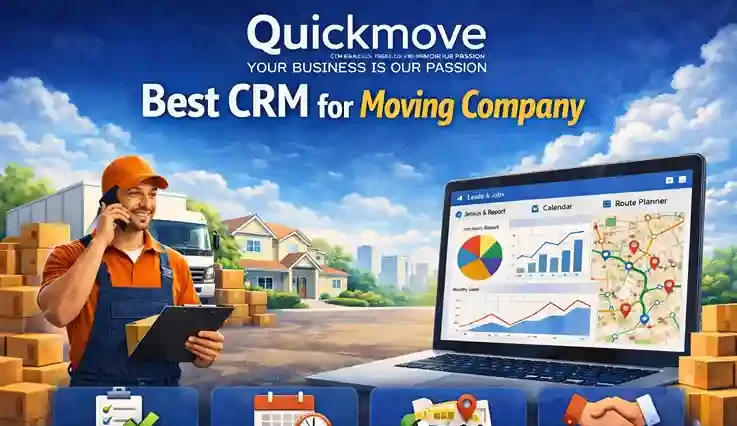
Running a moving company is not just about trucks and labor. It is about managing people, leads, estimates, schedules, follow-ups, payments, and customer relationships — all at the same time. As your business grows, spreadsheets, phone notes, and WhatsApp messages stop working. This is where a CRM becomes critical.
But here is the problem: most CRMs are not built for moving companies.
They are generic sales tools made for software companies, real estate agents, or call centers. Movers need something different. Movers need a system that understands quotes, cubic feet, truck availability, job statuses, dispatching, and customer communication — all in one place.
That is why choosing the best CRM for moving company is one of the most important decisions you will make.
Here, we will break down:
- What a CRM really means for a moving business
- Why most CRMs fail movers
- What features actually matter
- And why QuickMove is purpose-built as the best CRM for moving companies
What Is a CRM for a Moving Company?
CRM stands for Customer Relationship Management, but for moving companies, it means much more than storing customer names.
A moving CRM should help you:
- Capture leads from calls, websites, and ads
- Send accurate moving estimates
- Schedule jobs and assign trucks
- Track job progress from booking to completion
- Communicate with customers automatically
- Collect payments and reviews
In short, a CRM becomes the control center of your moving business.
If your CRM cannot handle moving-specific workflows, it becomes another tool you fight with instead of one that helps you grow.
Why Generic CRMs Do Not Work for Moving Companies
Many movers start with generic CRMs. At first, they seem powerful. But very soon, problems appear.
Here is why most generic CRMs fail movers:
1. They Are Not Built for Estimates
Moving estimates are not simple price quotes. They depend on:
- Distance
- Volume or weight
- Packing services
- Stairs, elevators, access issues
- Crew size and hours
Generic CRMs do not understand this logic. You end up doing calculations outside the system.
2. No Job & Dispatch Management
Most CRMs focus only on sales. They do not manage:
- Trucks
- Drivers
- Moving crews
- Job timelines
Movers need operations + sales in one system.
3. Too Complicated
Generic CRMs require consultants and months of setup. Most moving companies do not have time for that.
4. No Industry-Specific Automation
Follow-ups, reminders, confirmation emails, and post-move review requests are critical for movers. Generic CRMs require heavy customization to do this.
That is why movers eventually start looking for the best CRM for moving company, not just the most popular CRM.
What Makes the Best CRM for a Moving Company?
Before we talk about QuickMove, let us define what truly makes a CRM the best for movers.
1. Designed Specifically for Movers
This is the most important factor. The system should understand:
- Moving jobs
- Estimates and quotes
- Crews and trucks
- Job statuses
2. Simple and Easy to Use
Your office staff, dispatchers, and sales team should learn it quickly. No technical background required.
3. End-to-End Workflow
From the first call to final payment and review — everything should happen in one platform.
4. Automation That Saves Time
The best CRM for moving company should reduce manual work, not increase it.
5. Scales With Your Business
Whether you do 50 moves a month or 1,000+, the CRM should grow with you.
This is exactly where QuickMove stands out.
Introducing QuickMove: CRM Built for Moving Companies
QuickMove is not a generic CRM for movers. Every feature inside QuickMove is designed around how real moving companies operate every day.
QuickMove’s moving company CRM is used by:
- Local moving companies
- Long-distance movers
- Residential and commercial movers
- Multi-location moving businesses
That is why many movers consider QuickMove the best CRM for moving company today.
Lead Management: Never Miss Another Moving Job
In the moving business, speed matters. The first company to respond often wins the job.
QuickMove captures leads from a variety of places. With QuickMove, you can see:
- Lead source
- Call recordings
- Notes and follow-ups
- Status (new, quoted, booked, lost)
No more sticky notes or lost inquiries.
Accurate Moving Estimates Made Simple
Estimating is one of the hardest parts of running a moving company.
QuickMove simplifies this process with:
- Custom estimate templates
- Item-based or volume-based estimates
- Add-ons for packing, storage, and specialty items
- Automatic calculations
Sales reps can create professional estimates in minutes — not hours.
This is one of the main reasons movers choose QuickMove as the best CRM for moving company.
Job Scheduling and Dispatch Management
Once a job is booked, operations take over. This is where most CRMs completely fail.
QuickMove includes:
- Drag-and-drop job scheduling
- Truck and crew assignment
- Job timelines and statuses
- Daily and weekly views
Dispatchers can see everything clearly — no confusion, no double bookings.
Real-Time Job Tracking
QuickMove allows you to track:
- Job status (scheduled, in progress, completed)
- Assigned crew and truck
- Customer notes and special instructions
Everyone stays on the same page — office staff, dispatchers, and movers.
Customer Communication That Builds Trust
Moving is stressful for customers. Clear communication makes a huge difference.
QuickMove automates:
- Booking confirmations
- Move reminders
- Arrival notifications
- Post-move follow-ups
You can send emails or SMS automatically, without manual effort. This improves customer experience and builds trust.
Payments, Invoices, and Revenue Tracking
QuickMove handles the financial side of your moving business with:
- Automated invoices
- Online payment links
- Payment status tracking
- Revenue reports
No more chasing payments or manual accounting mistakes.
Built-In Reporting for Smarter Decisions
The best CRM for moving company should not just store data — it should help you grow.
QuickMove provides reports on:
- Lead conversion rates
- Revenue by source
- Job performance
- Crew efficiency
These insights help you make smarter business decisions.
Why QuickMove Is Better Than Other Moving CRMs
There are other CRMs that claim to work for movers. But QuickMove’s CRM software for movers stands out because:
1. No Unnecessary Features
Everything inside QuickMove is relevant to movers.
2. Fast Setup
You can be up and running quickly without technical headaches.
3. Dedicated Support
QuickMove understands the moving industry, so support teams speak your language.
4. Continuous Improvements
The platform evolves based on real mover feedback.
Common Mistakes Moving Companies Make Without a CRM
Most moving companies don’t realize how much money and time they lose every day just because their systems are scattered. It usually doesn’t feel like a big problem in the beginning. But as the business grows, small mistakes start piling up — and that’s when things get messy.
Here are some of the most common mistakes movers make when they don’t have a proper CRM in place:
1. Losing Leads without Even Knowing
This is the biggest one.
A customer calls. You’re busy. You say you’ll call back later. Then something else comes up — and you forget.
Or someone fills out a form on your website, and the inquiry gets buried in emails.
No follow-up means no booking.
Most moving jobs go to the company that responds first. If you’re slow or inconsistent, you’re losing jobs to faster competitors — even if your service is better.
2. Messy and Inconsistent Estimates
Without a system, estimates are often done manually — on paper, in WhatsApp chats, or random spreadsheets.
This leads to:
- Underpricing jobs (losing profit)
- Overpricing (losing customers)
- Missing important details like stairs, packing, or special items
When estimates are not standardized, every sales rep does things differently. That creates confusion for both your team and your customers.
3. Double Bookings and Scheduling Chaos
When jobs are tracked in notebooks or basic calendars, mistakes are almost guaranteed.
You might:
- Book two jobs for the same truck
- Assign the same crew to multiple moves
- Forget to block time for long-distance jobs
These mistakes don’t just cause stress — they damage your reputation. A single scheduling issue can turn into a bad review very quickly.
4. Poor Communication Between Teams
In many moving companies, sales, dispatch, and field crews are not fully connected.
Sales promises something to the customer. Dispatch doesn’t know. The crew shows up unprepared.
Now the customer is frustrated.
When information is scattered across calls, messages, and notes, things fall through the cracks. And fixing these mistakes on the job day is always harder.
5. Missed Follow-Ups and Reviews
After the move is done, many companies simply move on to the next job.
But this is where you lose long-term growth.
No follow-up means:
- No customer feedback
- No online reviews
- No repeat business
- No referrals
A simple message after the move can bring in future jobs. But without a system, it rarely happens consistently.
6. No Clear View of the Business
When your data is spread across different places, you never get the full picture.
You can’t clearly answer:
- Which lead sources bring the most jobs?
- Which sales reps perform best?
- Which jobs are most profitable?
So decisions are based on guesswork instead of real numbers.
Who Should Use QuickMove’s Moving Company CRM?
QuickMove is ideal for:
- Small moving companies wanting to scale
- Medium-sized movers managing multiple crews
- Large moving businesses needing structure and automation
Whether you are just starting or already established, QuickMove adapts to your needs.
Best CRM for Moving Company in 2026
Choosing the right CRM is not about features — it is about fit.
A moving company needs a CRM that understands its daily challenges. QuickMove is not just software; it is a business system designed for movers.
If you are serious about:
- Increasing bookings
- Reducing manual work
- Improving customer satisfaction
- Scaling your moving business
Then QuickMove is not just an option — it is the best CRM for moving company.