Email Us
 Freight Forwarding Software
 Warehouse Management System
 Transport Management System
 Moving/Removal Software
 Service Portal
 Move Survey Quote Pro
 Digital Logistics Inventory App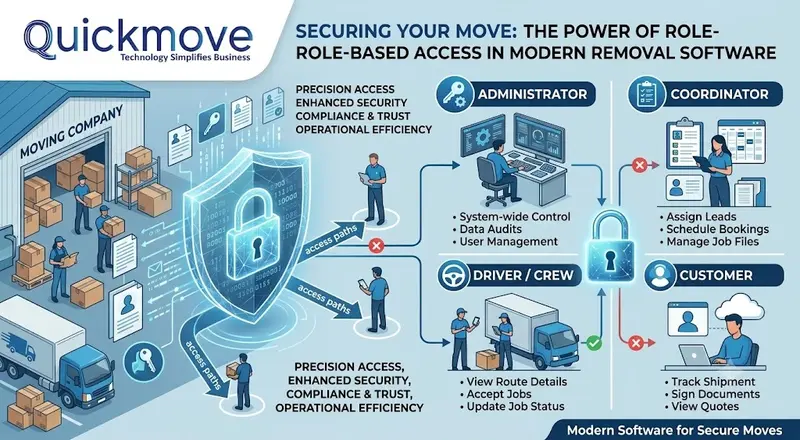
The moving and removal industry is a multifaceted ecosystem that depends on an extensive number of logistics, financial, and customer-centric processes for its successful performance. These processes require the collection and storage of large volumes of data in an environment where human error can have dire consequences. In such a scenario, it becomes exceptionally important to implement robust access control mechanisms in order to ensure business continuity, preserve client relationships, and prevent data breaches. The latest advancements in the field make it possible via the role-based user management system.
Access Control in the Moving Industry
Data security is extremely important within the domain of the Moving/removal services. It concerns a plethora of information, including customer contact details, inventory lists of valuables, financial reports, staff schedules, and more. Failing to properly manage access to these data sets can lead to both business losses and damage to the company’s reputation. In addition, laxity on this front can result in legal issues if regulatory authorities raise concerns.
It is paramount to understand that the access control systems of today provide organizations with an array of benefits and options. The underlying principle is relatively simple – a set of permissions is provided to users on an individual basis, thus defining the features available to them in the software. These permissions can range from read-only to full control over the designated data sets, and their scope may vary depending on the organization’s needs.
Overview: The Role-Based Access Control Advantages
It is common practice in the logistics sphere to authorize users on a role-based basis, i.e. provide access to certain software components depending on their position and responsibilities. This approach is highly beneficial for a moving company, as it allows it to design a set of permissions that would effectively address the needs of each individual employee or department. Below are some of the advantages offered by the access control mechanism described above.
- Enhanced Information Security – One of the most important benefits of implementing a role-based access control system is the opportunity to ensure a high level of information security within the organization. It is achieved via the least privilege principle – employees are only provided with the set of permissions that is required for the performance of their operational duties. This minimizes the likelihood of data breaches, unauthorized changes to information, and other security concerns to a significant extent.
- Restricted Access to Core Processes – Along with data security, it is critically important to ensure that core operational processes are protected from unauthorized interference. A role-based access control system makes it possible by enabling managers to grant permissions to individual users, groups of employees, or entire departments based on their functional duties. This design philosophy is particularly useful in the context of a moving company, where financial information and processes are some of the most sensitive elements.
- Improved Governance and Compliance Capabilities – It is extremely important for moving companies to ensure compliance with applicable data privacy laws and regulations, such as the GDPR or CCPA, depending on the jurisdiction of operation. In this regard, a role-based access control system presents a major advantage, as it allows firms to implement a uniform set of policies across their operations in order to guarantee a high level of governance.
- Increased Levels of Accountability – A properly designed role-based system greatly contributes to the improvement of accountability practices within a firm. In particular, the implementation of individual permissions for each employee provides organizations with enhanced auditing capabilities, thus enabling them to establish an accurate record of employee activity. For instance, in the context of a moving company, such a system may help managers detect discrepancies by reviewing the access permissions of an individual employee.
QuickMove’s Security and Access Control Solutions
QuickMove Technologies appreciates the aforementioned benefits of an adequately designed access control system and therefore integrates state-of-the-art security mechanisms into its Moving/Removal Software. In particular, the firm understands the necessity to ensure the confidentiality of the personal information of the company’s clients, thus implementing a set of measures in order to guarantee data security and procedural integrity.
Core Features Overview
QuickMove Technologies Moving/Removal Software enables the designated organization to provide total control over the company’s data and operations by means of an extensive set of security features.
The Role-Based Access Control System
QuickMove’s role-based access control system allows managers to assign individual permissions to each user, group of users, and entire departments. It serves as the backbone of the firm’s information security infrastructure, thus enabling it to comply with the least privilege principle.
Customer-Specific Permissions
QuickMove Technologies Moving/Removal Software puts the organization’s administrators in charge of managing permissions within the system. It allows them to configure both individual and team-level permissions in accordance with the needs and preferences of the company.
Permissions at Different Levels
The software provides users with the opportunity to assign permissions at various levels within the system. In particular, companies can choose to authorize employees on a company, branch, or module-specific basis. This grants administrators the flexibility and control needed to configure the system in accordance with the requirements of the firm.
QuickMove Role-Based Access Control Overview
QuickMove Technologies Moving/Removal Software helps organizations optimize their operations by implementing a robust set of permissions that allow them to manage the software in accordance with their unique requirements. In particular, the flexibility of the system is manifested in the opportunity to customize the roles of users, groups of users, and entire departments in order to achieve the best possible outcomes.
Implementation: How to Set Up Access Controls in Your Moving Company
It is important to recognize that the effectiveness of an access control system is dictated by the extent to which it addresses the needs and priorities of the organization. In this regard, the primary consideration is the list of roles that must be taken into account when designing the system. Below are some of the key steps that a moving company can take in order to configure the permissions system.
Defining Users Roles
In order to develop an efficient role-based access control system, it is essential to identify the key functions performed by the users of the software. The list of duties should be created for each role in accordance with the organizational structure of the firm. Below are some of the most common roles in the context of a moving company:
- Office Administrator: Performs all administrative duties related to the operations of the moving company, including managing human resources, financial operations, reports, and other aspects.
- Move Coordinator: Responsible for the execution of all tasks related to jobs, including scheduling, management of customers and crews, invoicing, and other responsibilities.
- Crew Supervisor: Oversees the work of the crew in accordance with the requirements of the moving job, which necessitates access to the job details, inventory lists, and other relevant data.
- Crew Member: Executes the duties related to the moving jobs, which requires access to the relevant job instructions and inventory lists.
- Sales Representative: Manages leads and estimates in order to facilitate the creation of new jobs.
- Customer: Views the contents of their moving inventory and the status of their job via the dedicated portal.
Next, it is necessary to examine the tasks performed by each role in order to define the features that the users must be able to access. For instance, based on the description above, an Office Administrator should have full control over all processes and data sets, which aligns with the least privilege principle. In turn, a Sales Representative would benefit from the ability to view and update leads, as well as access the CRM module.
Quick Reference: Role Permissions Table
| User Role | Typical Access Level | Example Permissions |
|---|---|---|
| System Administrator | Full Access | Manage all users, roles, settings, financial data, and reports. |
| Operations Manager | Operational & Reporting | View and manage all jobs, crew schedules, inventory, and performance dashboards. |
| Move Coordinator | Customer & Job Management | Create and edit customer bookings, assign crews, manage inventory, and process billing. |
| Crew Supervisor | Job Execution | View assigned jobs, inventory lists, customer contact information, and update job status via the mobile app. |
| Crew Member | On-Site Tasks | Access job checklists, scan inventory items, and update task completion using the survey app. |
| Sales Representative | Lead & Estimate Management | Access the CRM module, manage leads, create quotes, and communicate with customers. |
| Customer (Portal) | Self-Service | View move inventory, track shipment status, and access digital documents. |
By implementing a thoughtful RBAC strategy, you transform your moving software from a simple operational tool into a secure, compliant, and accountable platform that empowers your entire organization. This approach not only protects your business but also builds customer confidence and enables sustainable growth.